How It Came About
Because of the pandemic I didn’t go home for the holiday. Stuck indoors with nothing to do, I took a deeper look at Jenkins and read through some of the Jenkins source code.
A Few Words First
Frankly, Jenkins’ official documentation is, I would say, the worst I have seen among open-source projects.
The first problem is that it’s chaotic — unlike other projects, it has no unified documentation entry point.
The second is that the content is incomplete; it’s very hard to find an official, complete description of Jenkins’ architecture and usage details.
The last is that the learning curve is fairly steep. Some of the official material barely counts as an introduction, and the wording is very loose — unlike some other open-source projects, which deliberately use simple, common words with the same meaning; other parts are generated entirely by a program, like a dictionary or a handbook, with basically no guidance or explanation.
This article first focuses on the more important technologies involved in Jenkins’ basic architecture.
1. Stapler
The main creator of Jenkins is Kohsuke Kawaguchi, and Stapler was developed by this same developer.
Stapler is currently used mainly by the Jenkins project and, before it, Hudson.
Stapler is a Java web framework whose main function is to bind application objects (Java classes) directly to URLs. The core idea of Stapler is to assign URLs to objects automatically, thereby creating an intuitive URL hierarchy.
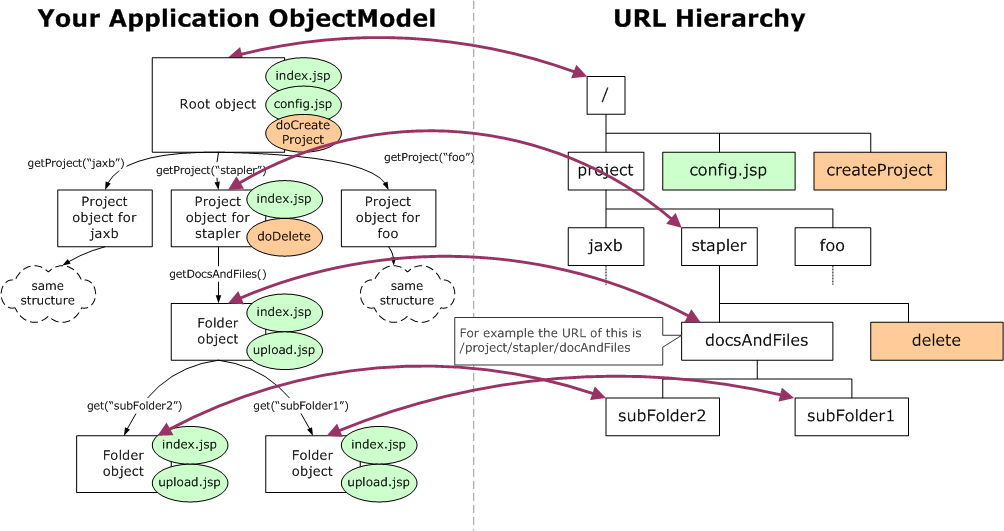
In the Jenkins source code, the object model lives mainly under the /core/src/main/java/hudson/model and /core/src/main/java/jekins/model directories.
2. Jelly & React
Jelly is the main view technology Jenkins uses (similar to JSP + JSTL).
Similar to JSTL, Jeknins defines some Jelly tag libraries of its own.
In the Jenkins source code, Jenkins’ custom tag libraries are under the /core/src/main/resources/lib directory.
In Jenkins’ new UI, the main technology used at present is React.
3. XStream
Jenkins uses the file system directly to store data.
That is, under the well-known JENKINS_HOME directory.
Data is stored in the form of text files. Some are plain text, such as job logs; some are Java properties files; and the most important are the XML format, such as the config.xml we see all the time.
Using XStream technology makes it easy to convert object information into XML files for storage.
4. Plugins
The object model in Jenkins is extensible.
Jenkins provides extension interfaces through extension points (ExtensionPoint), and third parties can develop plugins against these extension points to extend Jenkins’ functionality.
What’s more, plugins can also define new extension points for other developers to build new plugins on.
By reading the source code you can see that some of Jenkins’ built-in features are also implemented on top of extension points Jenkins provides.
For example, hudson.tasks.ArtifactArchiver and hudson.tasks.Fingerprinter are both features developed on top of hudson.tasks.Recorder, and these two correspond to the archiveArtifacts and fingerprint steps in Jenkins Pipeline.
Plugins such as DRY Plugin and FindBugs Plugin are also developed on top of the hudson.tasks.Recorder extension point.
Jenkins’ plugin mechanism means that there is no difference whatsoever in use between built-in features and features provided by plugins.